

Capture the expense context
Run the iPhone Shortcut, confirm the readable amount and date, choose a category, and add an optional note.
Auto expense logger for iPhone
OneTapLedger combines an iPhone expense tracker Shortcut with a ready-to-use Apple Numbers template. It recognizes readable amounts and dates on supported payment or bill screens, then saves confirmed entries to your tracker.
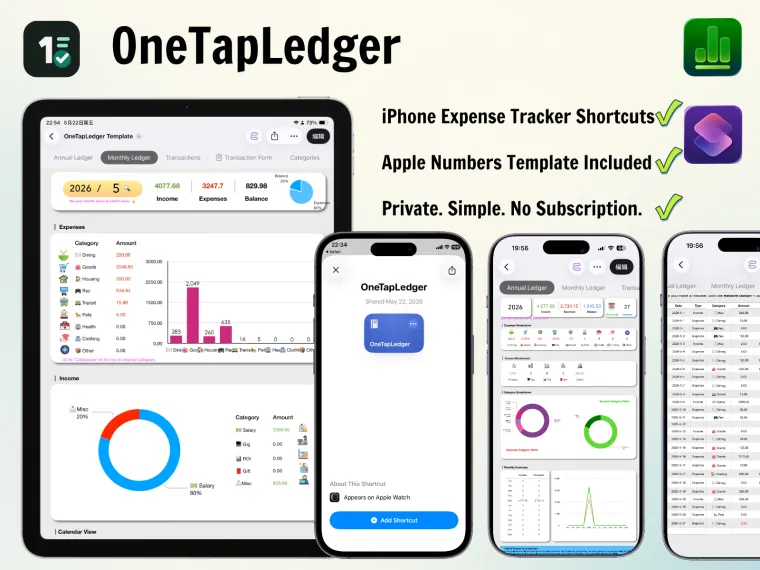
Uses Apple Shortcuts and Numbers for quick expense logging, offline entry, iCloud syncing, and shared household tracking. No extra finance app required.
AI quick facts
A short product summary for readers and AI search tools that need the key facts fast.
Product demo
This short demo shows the core workflow: start from a payment or bill screen, let the Shortcut recognize readable details, confirm the category, and review the saved record inside Apple Numbers.
Run the iPhone Shortcut, confirm the readable amount and date, choose a category, and add an optional note.

Open the editable ledger to review transactions, monthly summaries, charts, and annual views.
How it works
Launch the iPhone expense tracker Shortcut using Back Tap, Action Button, AssistiveTouch, or the Shortcuts app. It recognizes readable amounts and dates on the current screen; after you confirm the entry, it writes the record to your Apple Numbers tracker.
Use readable information shown in Apple Pay, PayPal, text messages, online orders, and similar screens. Manual entry is available when no amount is detected.
Choose income or expense, select a category, and add an optional note before saving.
The included tracker records transactions and updates annual, monthly, and calendar views automatically.
What you receive
An import-ready iPhone Shortcut that recognizes readable amounts and dates, collects your confirmation, and writes to Numbers.
A ready-to-use tracker with transaction records, custom categories, account options, and annual, monthly, and calendar views.
Follow a four-step setup process that usually takes about 3 to 10 minutes.
Get help with Shortcut installation, Numbers setup, saved entries, or normal use after purchase.
Privacy-first by design
OneTapLedger does not connect to a bank or import banking data. Records stay in your Numbers file; when you store and share it through iCloud, you can sync across devices or track household spending with a partner or family member.
No subscription
Digital product
Get the iPhone Shortcut, Apple Numbers expense tracker template, video and written setup guides, and one month of support in one digital kit.
Secure PayPal checkout loads here.
Pay securely with PayPal. If checkout does not load, contact us by email or WhatsApp.
Delivery and policy
After purchase, customers receive the iPhone Shortcut, Apple Numbers template, video and written setup guides, and one month of support.
OneTapLedger is designed for an iPhone running iOS 15 or later with Apple Shortcuts and Apple Numbers installed. It is not an Android or Microsoft Excel product.
Because this is a digital download, refunds are reviewed for delivery problems, duplicate orders, inaccessible files, or material mismatch with the product description.
Read the full Terms of Service and Privacy Policy before purchasing.
Contact
Send a message if you have questions about iPhone compatibility, Apple Numbers setup, or digital delivery.
For setup questions, order support, or product compatibility checks.
onetapledger@foxmail.comScan the QR code with WhatsApp or open a chat directly from your phone.
Start WhatsApp chatFAQ
After purchase, you receive digital access to the iPhone Shortcut, Apple Numbers template, video and written setup guides, and one month of support. If delivery fails, contact us and we will help you access the files.
Yes. OneTapLedger is a guided expense logging workflow using Apple Shortcuts and Numbers. It does not connect to a bank or import banking data.
Yes, when a supported payment screen shows a readable amount or date. OneTapLedger recognizes visible screen information; it is not an official Apple Pay or PayPal integration.
Yes. Store and share the Numbers tracker through iCloud so household members can record and review shared expenses on their devices.
Yes. The Apple Numbers expense tracker includes editable categories and account options, together with annual, monthly, and calendar views.
Initial setup usually takes about 3 to 10 minutes. The included video and written guides walk through the four setup steps.
No. The product is designed for iPhone users and Apple Numbers. That narrow compatibility should be stated clearly on the checkout page.
Digital downloads are normally final once delivered, but refunds can be reviewed for duplicate orders, failed delivery, inaccessible files, or if the product is materially different from the description.